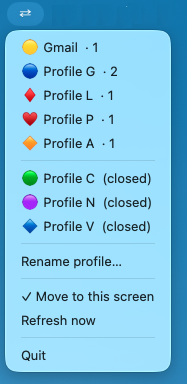
A tiny menu bar app that lives outside Chrome. Switch from the menu bar, Dock, or Spotlight — one click brings all your profile's windows to the front, centered on the screen your mouse is already on.
If a profile has three open windows, all three come to the front — not just the last active one.
Windows are placed at 80% of the screen, centered, every time. No more hunting for a window buried behind something else.
On multi-monitor setups, windows move to whichever screen your cursor is on when you click. No dragging required.
Option+click a profile to minimize all other profiles' windows instantly. One context at a time.
The keyboard shortcut rotates through all your profiles — including ones with minimized windows, not just visible ones.
Clicking a profile with no open windows launches Chrome directly into it. Auto-detects, no manual setup.
Generate a native macOS app for each Chrome profile. Drag any of them to your Dock for one-click switching without ever opening the menu bar.
Press ⌘Space, type a profile name, and hit Enter. Chrome Hopping switches you straight to that profile — no mouse needed.
Click ⇄ in the menu bar → ⚙ Settings → Update Dock & Spotlight apps. A dedicated .app with a colored icon is created for every profile in ~/Applications/Chrome Profiles.
Open ~/Applications/Chrome Profiles in Finder and drag any profile app onto your Dock. One click on the icon switches directly to that profile.
Press ⌘Space, start typing your profile name (e.g. "Work", "Personal"), and press Enter. Chrome Hopping opens and brings that profile to the front instantly.
Press ⌘§ to cycle through your open Chrome profiles without reaching for the mouse.
Requires macOS 12+, Google Chrome, and Python 3.10+.